Everything a deal room needs, and the proof behind it
Every feature on this page is in the product today. What is coming is listed at the end, and marked as such.
Rooms and templates
One room per transaction, set up in under a minute from a template that matches the deal.
- Templates for four kinds of deals
- Capacity sale or lease (10 sections, 39 checklist items), GPU compute contract (8 sections, 27 items), site acquisition and development (10 sections, 40 items) and GPU financing (9 sections, 27 items), or a blank room.
- Codenames
- Give a room a codename and guests only ever see it: in page titles, notifications, emails, watermarks and the names of their downloads. Your team sees both.
- Fact sheet
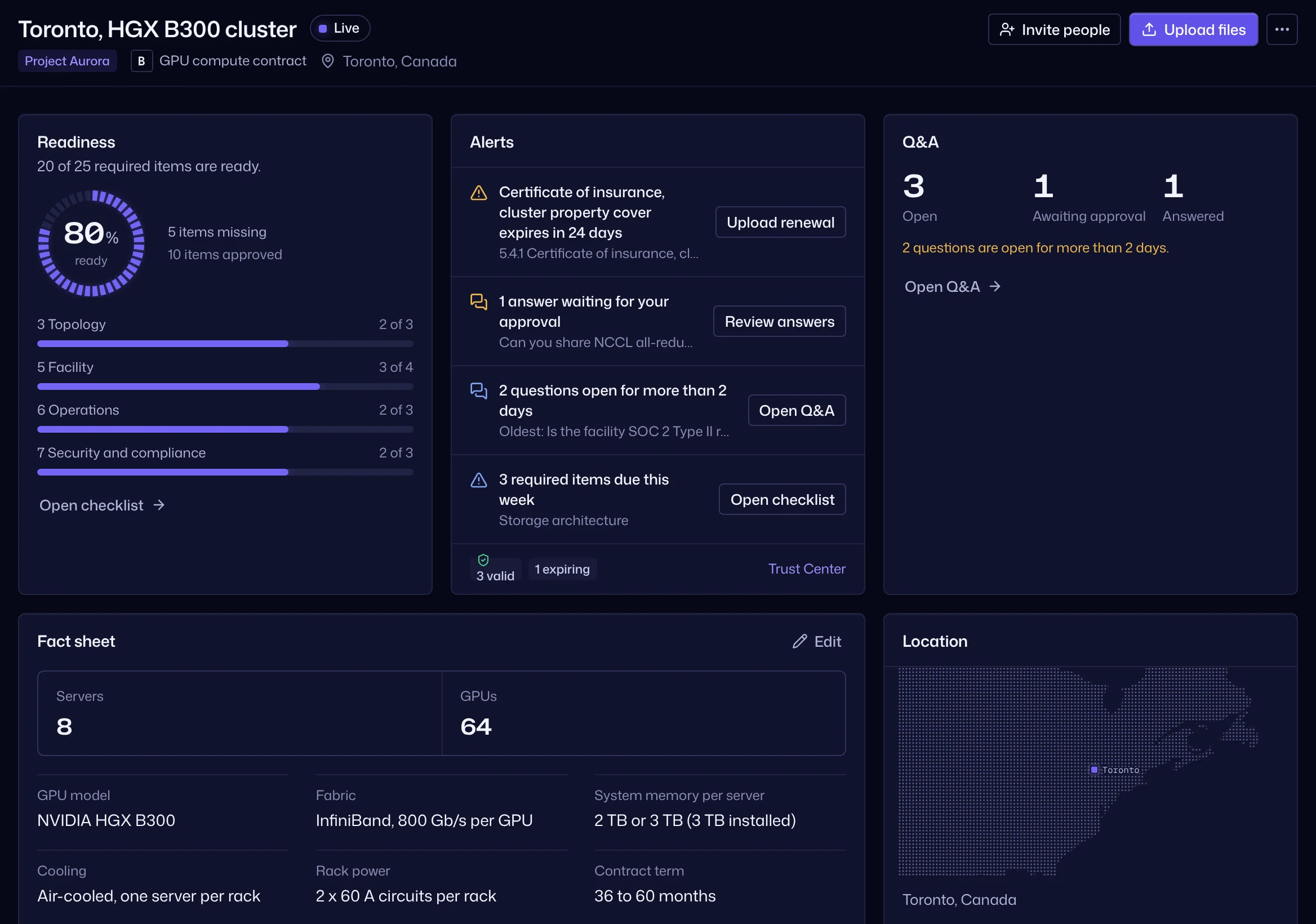
- The key figures of the deal on the room overview, with their units: MW, kW per rack, cooling, GPU model, node count, availability date.
- Lifecycle
- Preparation, live, closed and archived. Guests get in only while a room is live, and a closed room shuts them out at once.
- All rooms at a glance
- Every room with its readiness, parties and alerts, a map of room locations by city, and a list of what needs attention: expiring certificates, open questions, quiet parties.
Documents and the index
A numbered index that keeps itself in order, for rooms with ten documents or a thousand.
- Numbers that renumber themselves
- Index numbers come from position: 1, 1.1, 1.2.3. Move a folder or a document and every number updates, the same for everyone, so “4.4.3” means one document to every party.
- Upload files and whole folders
- Drag files or folders with subfolders into the index. Each upload shows its progress, failed files can be retried, and when it is done the room tells you which companies can now see it.
- Versions
- A new file on a document becomes its next version. History is kept, and an older version can be made current again as a new version.
- Details and badges
- Description, tags, document date, issuer, expiry and linked assets. Badges show what is new or updated since each person's last visit, what is expiring or expired, and what is restricted.
- Bulk work and search
- Select many documents to move, delete or tag them. Search covers titles, index numbers, tags, the text inside PDFs and Office files, serial numbers and Q&A, and Ctrl or Cmd K opens a command palette.
- Fingerprints
- Every file gets a SHA-256 fingerprint on upload. “Verify file” checks the stored copy again, and a mismatch alerts the room's owners and admins.
- Deleted items
- Deleted folders and documents stay in the room's deleted items for 30 days, where owners and admins can restore them.
Viewer and watermarks
Guests read everything in the browser, with their identity on every page.
- Opens in the browser
- PDF; PNG, JPEG, GIF and WebP images; Word, Excel and PowerPoint, converted to PDF on the server; text, Markdown, JSON and logs; CSV as a table. Nothing to install.
- Dynamic watermark
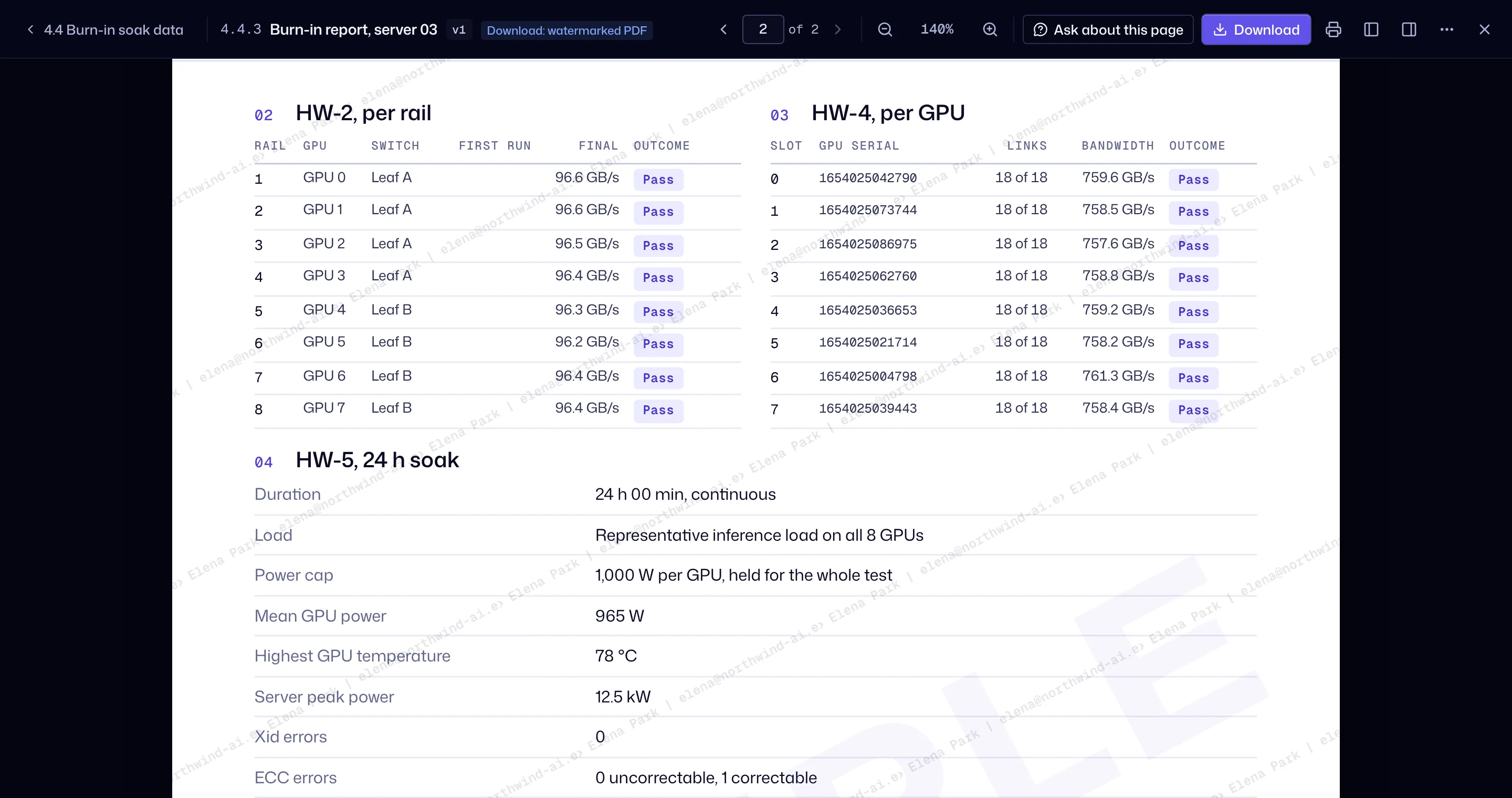
- Name, email, IP address and time, tiled across every page on screen. Downloads are stamped on the server on every page, with a footer naming who downloaded it, from which room and when.
- Download and print control
- Each company can view, print, download a watermarked PDF or download the original, as you set it. Downloads below “original” are always stamped.
- Reading time per page
- The viewer records how long each page is read, for analytics.
- Ask about this page
- A guest can ask a question from the page they are reading; the question carries the document and the page.
- Details beside the document
- Versions, linked evidence, questions about the document, who can access it and its SHA-256, in one panel.
- Keyboard and phone
- Keyboard shortcuts in the viewer, and a viewer that works on a phone.
Companies, permissions and NDA
Each counterparty is a party with its own stage, rules and view of the room. Parties never see each other.
- Parties
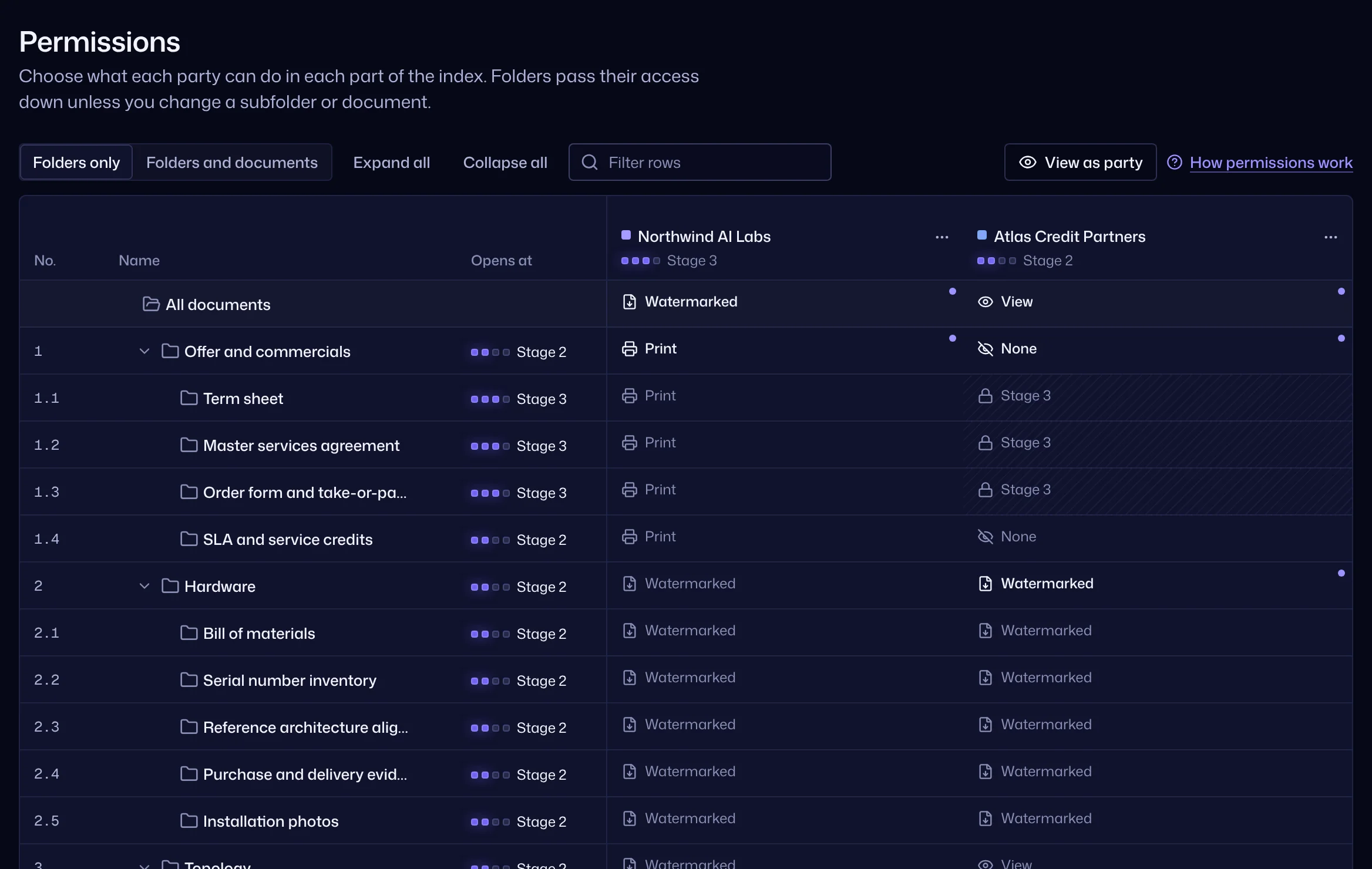
- Customer, lender, investor, partner or advisor, each with a disclosure stage, an access window, an IP allowlist and a two-factor rule.
- Six permission levels
- No access, view, print, download a watermarked PDF, download the original, upload. Set them at the room, a folder or a document; the nearest setting wins.
- Stage gates
- Folders open by stage: teaser, NDA, LOI or term sheet, confirmatory. A party below a folder's stage does not see it at all, whatever its permissions say.
- View as a party
- Preview the room exactly as a company will see it before you invite it, with a count of what is hidden and why.
- NDA gate, on by default
- Every new room starts with the NDA on. Guests accept the room's NDA before anything opens, and each acceptance records the person, the version, the name typed, the time and the IP address. Publish a new version and everyone accepts it again.
- NDAs signed outside the data room
- Record an NDA already signed on paper or by e-signature, for a whole company or one person, with the signed copy kept for your team only. Those guests skip the NDA step. Without the copy, the room keeps reminding you until it is attached.
- One NDA register
- Every party and guest with how they are covered: accepted in the room, signed outside with the document, or still missing. Filter it and export it as CSV.
- Invitations, with or without email
- Owners and admins set up outgoing email in the app, with presets for Google Workspace, Microsoft 365 and other providers and a test email before saving. Every invitation also has a link you can copy, and until email is set up, invitations wait in an outbox.
- Companies kept apart
- A guest never sees another party's name, people, questions, NDA status or activity. Documents uploaded by your team show your workspace, not a person.
Questions and answers
Questions reach the right person, and answers go out only once approved.
- Ask in context
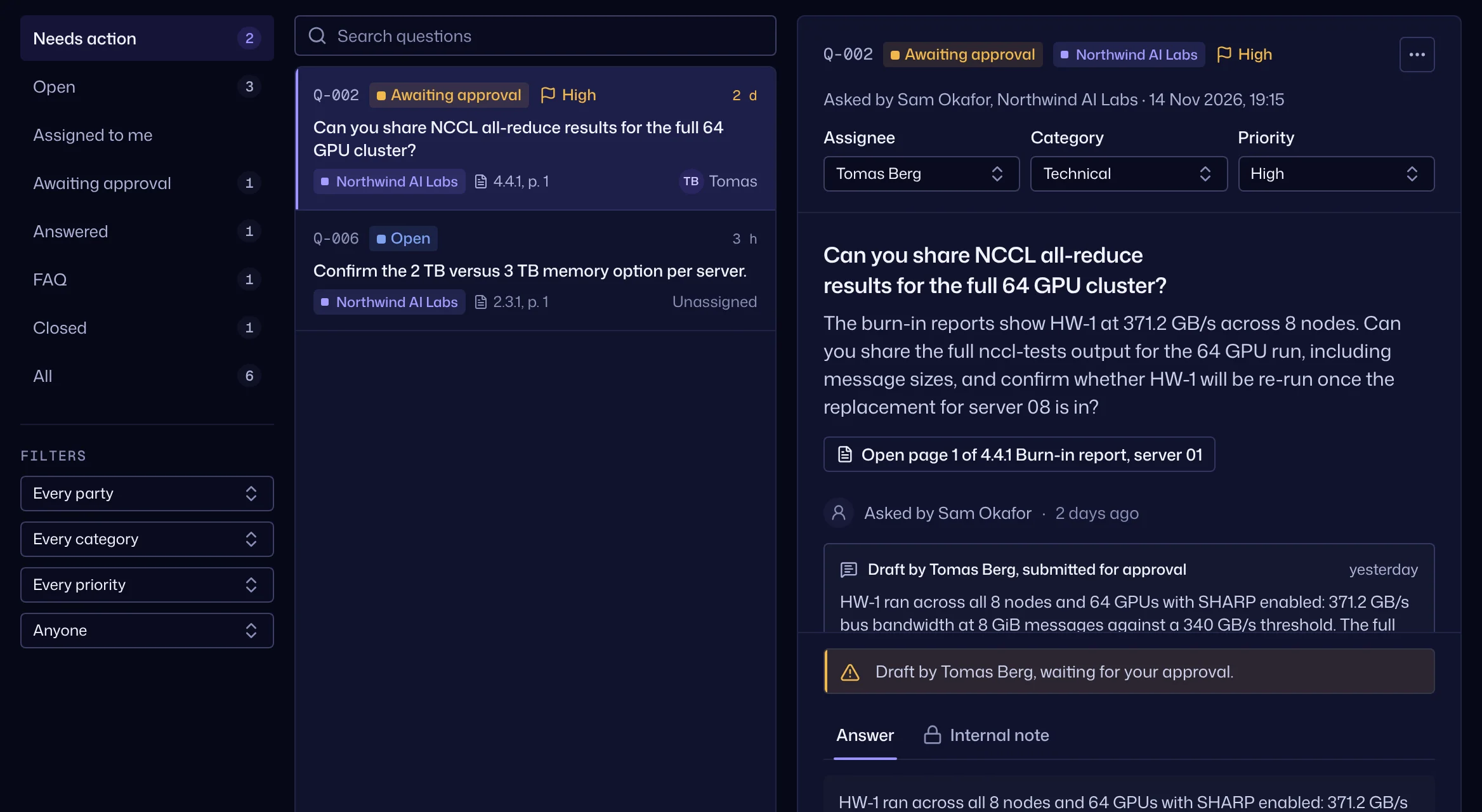
- From the Q&A page or from a page in the viewer. Each party sees only its own questions, plus the published FAQ.
- Route and track
- Category, priority, assignee and internal notes that guests never see.
- Approve before release
- Editors draft, owners and admins approve. Nothing reaches a guest until it is released.
- Publish as FAQ
- Share a good answer with every party as an edited, anonymous copy; the original stays with its party.
- Simple states for guests
- Submitted, in progress, answered and closed. Export the whole Q&A as CSV.
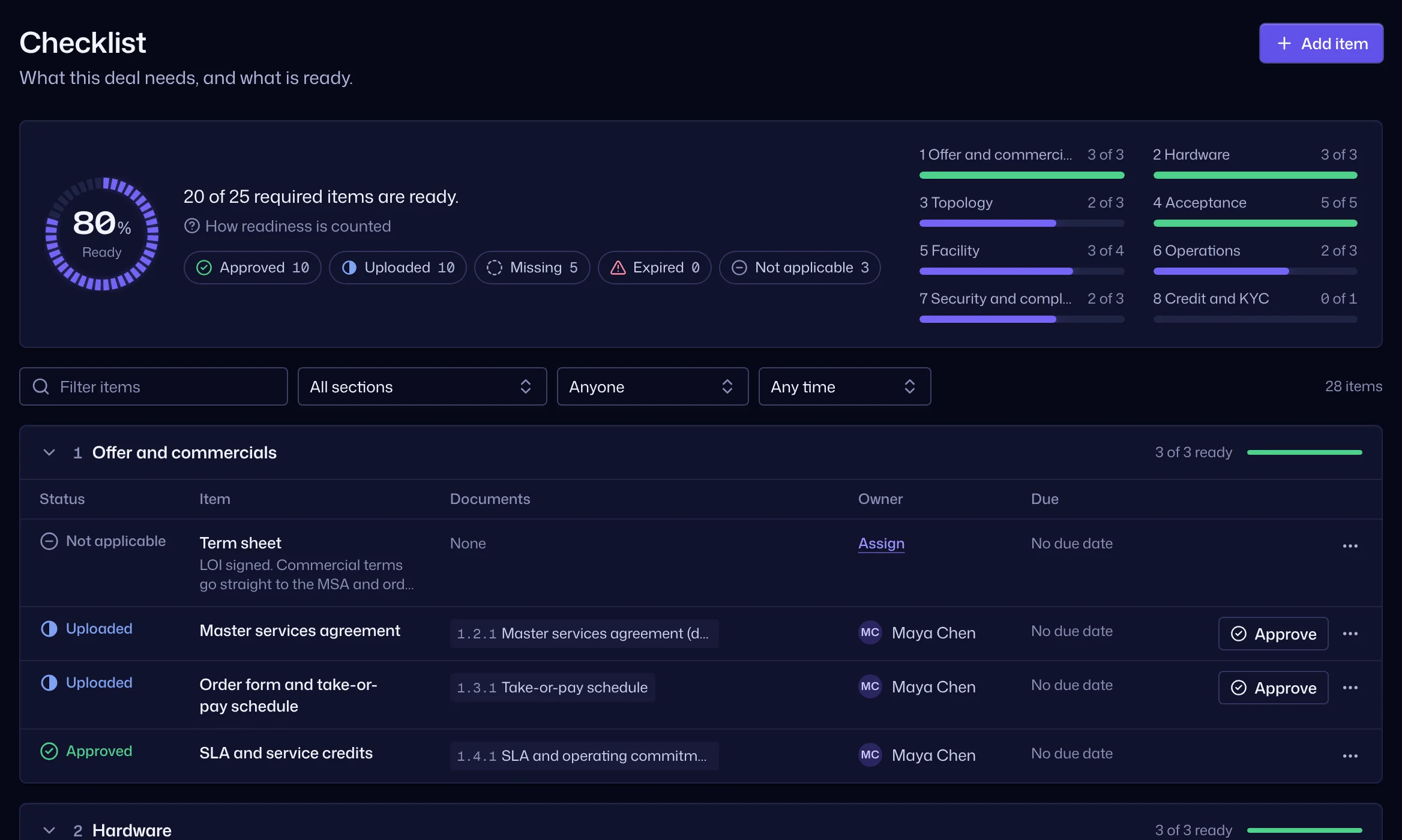
Checklist and readiness
Know what is missing before a counterparty asks.
- Checklists from the template
- The evidence a counterparty expects, grouped by section, with an owner and a due date per item.
- Status per item
- Missing, uploaded, approved or not applicable, with linked documents.
- Readiness score
- The share of applicable items that are present and in date. Expired evidence counts as missing.
Evidence register
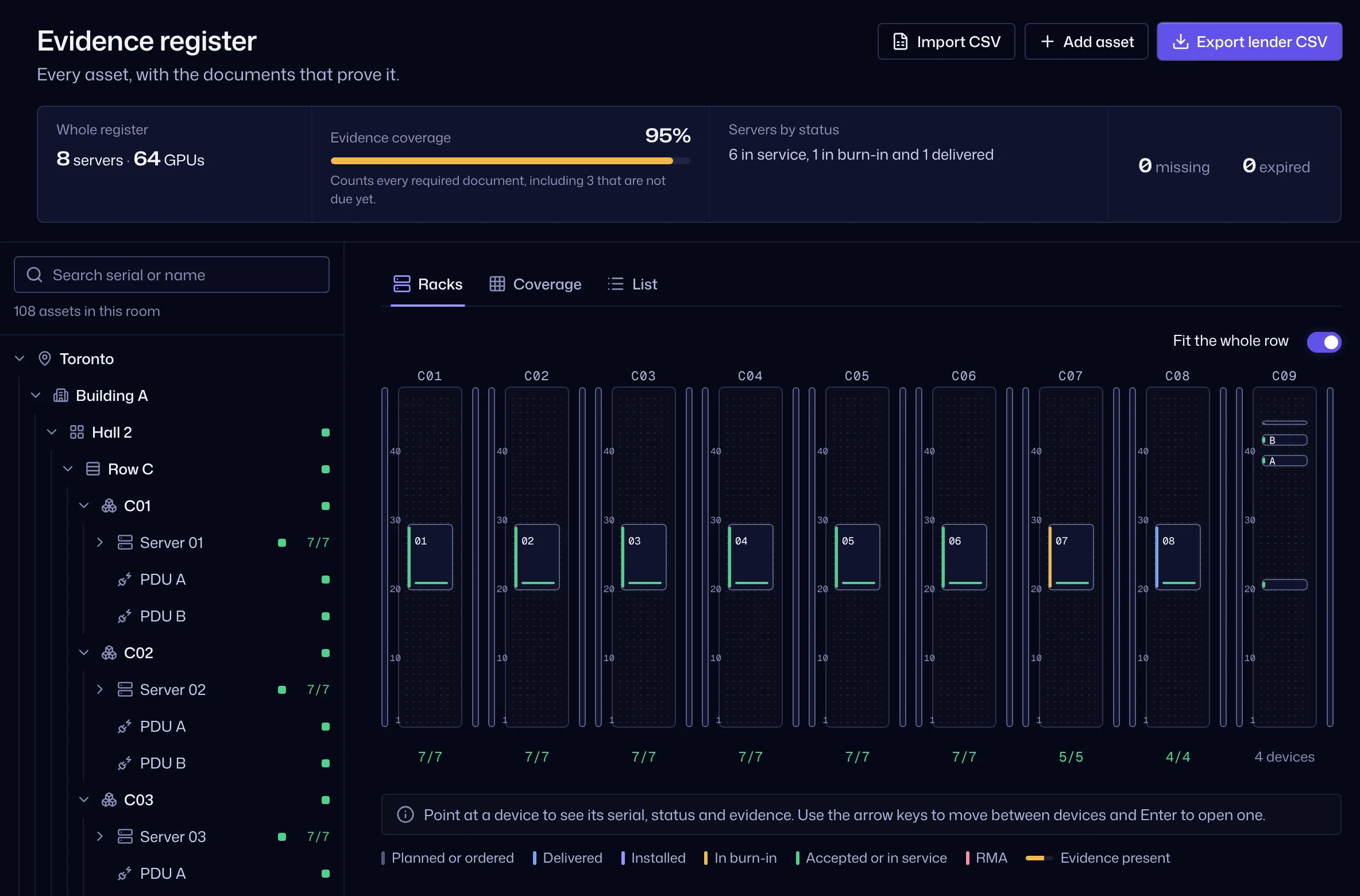
For deals where documents prove physical things: every asset, with the documents that prove it.
- From site to GPU
- Site, building, hall, row, rack, server, switch, PDU, CDU, storage and GPU, each with its serial, model and status, from planned and ordered to accepted, in service or RMA.
- Rack elevations
- Each rack drawn with its devices, their status and their evidence count.
- Evidence and coverage
- Link documents by what they prove: invoice, bill of lading, delivery receipt, installation photo, burn-in report, acceptance certificate, insurance, warranty, lien release. Seven proofs are expected per server, a proof on a row or rack covers what is below it, and coverage shows the gaps.
- Import and search
- Import up to 5,000 assets from CSV in four checked steps, and find any serial from the search.
- Lender export
- A serial register as CSV, with the evidence links and their SHA-256 hashes.
Certificates with expiry dates
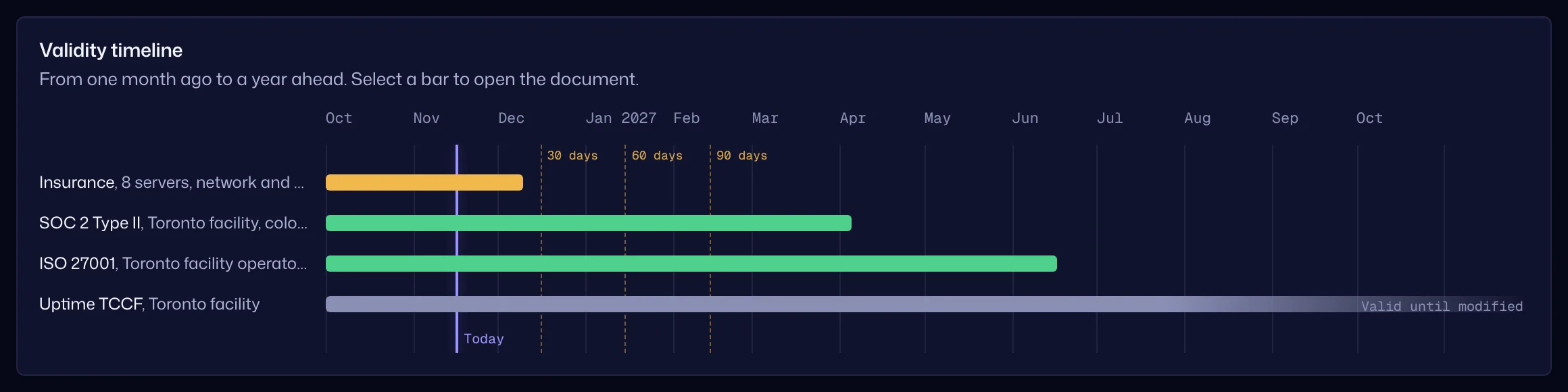
Certificates and reports are time-bound. The room tracks them.
- Certificates as records
- SOC reports, ISO and Uptime certificates, insurance and permits with issuer, scope, issue date and expiry, or “valid until modified.”
- Alerts before expiry
- Valid, expiring within 90 days, or expired. Your team is alerted at 90, 60 and 30 days, and expired documents stay visible, marked expired, and count as missing.
- Renewal in place
- A renewed certificate becomes the next version of the same document, so links, checklist items and evidence stay where they are.
Analytics
Who is reading what, and for how long.
- By company, person and document
- Views, time spent, downloads, questions and last activity.
- Heatmaps and timeline
- Reading time by company and section, activity over time, and time per page for each document.
- Quiet parties
- A company that accepted the NDA and has not been active for seven days is flagged.
- Clean numbers
- Your own team and previews never count. Export the numbers as CSV.

Activity log and closing archive
A record of every action that shows if anything was changed.
- Everything recorded
- Sign-ins, views, downloads, uploads, permission changes, invitations, NDA acceptances, questions and settings, each with the person, the time and the IP address.
- Hash chain
- Each entry carries the SHA-256 of the entry before it, and the database refuses edits and deletions. “Verify chain” recomputes every entry and names the first one that does not match.
- Closing archive
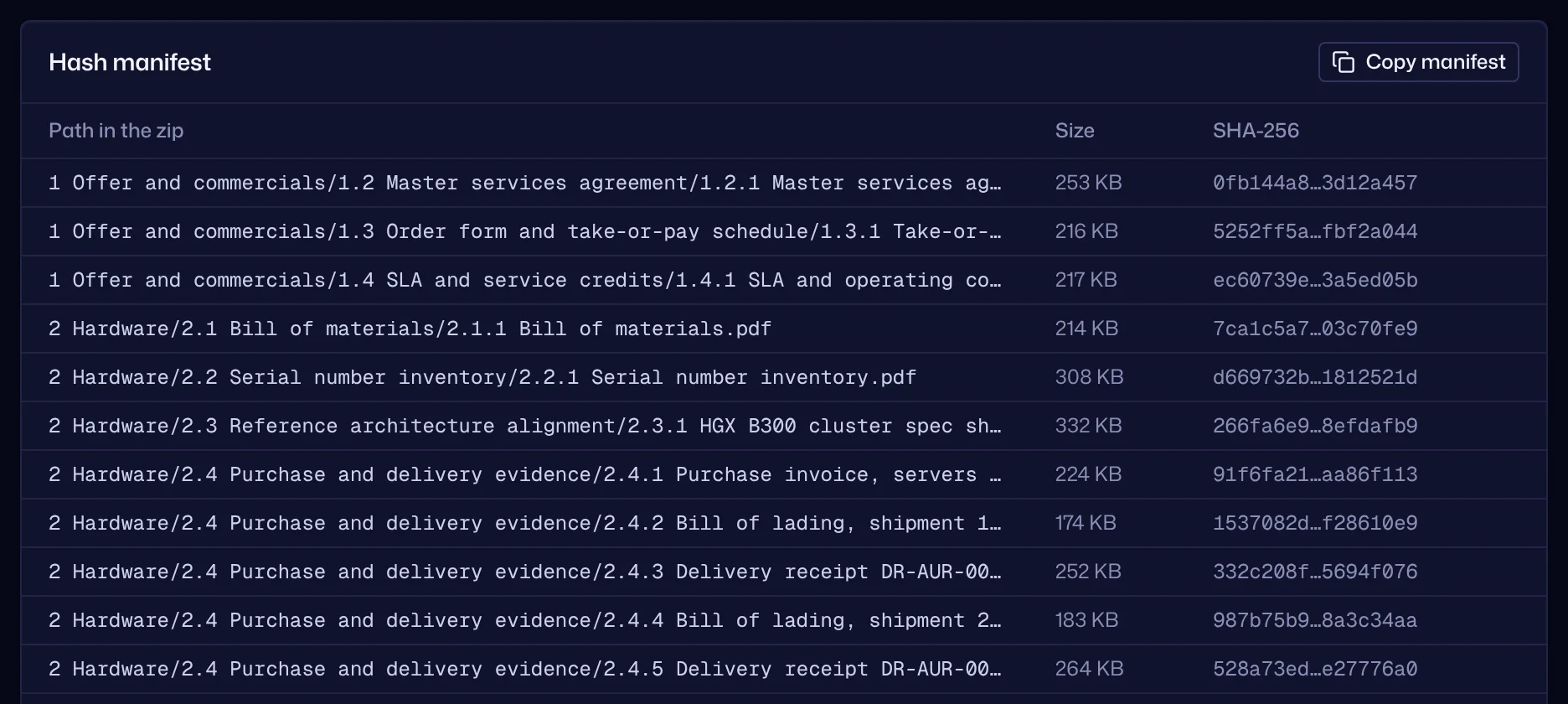
- One zip with the numbered folders and files, earlier versions if you want them, a SHA-256 manifest of every file, the activity log with every hash, the NDA acceptances, the Q&A and the checklist.
- Checked offline
- Anyone with the archive can check it years later with one command: shasum -a 256 -c MANIFEST.sha256 on macOS, sha256sum -c on Linux.
Share links
Send one document or folder before a company joins the room, and bring it in when the deal moves.
- Controlled links
- Email capture, allowed emails or domains, a passcode, an expiry date, downloads on or off, watermark and the room NDA.
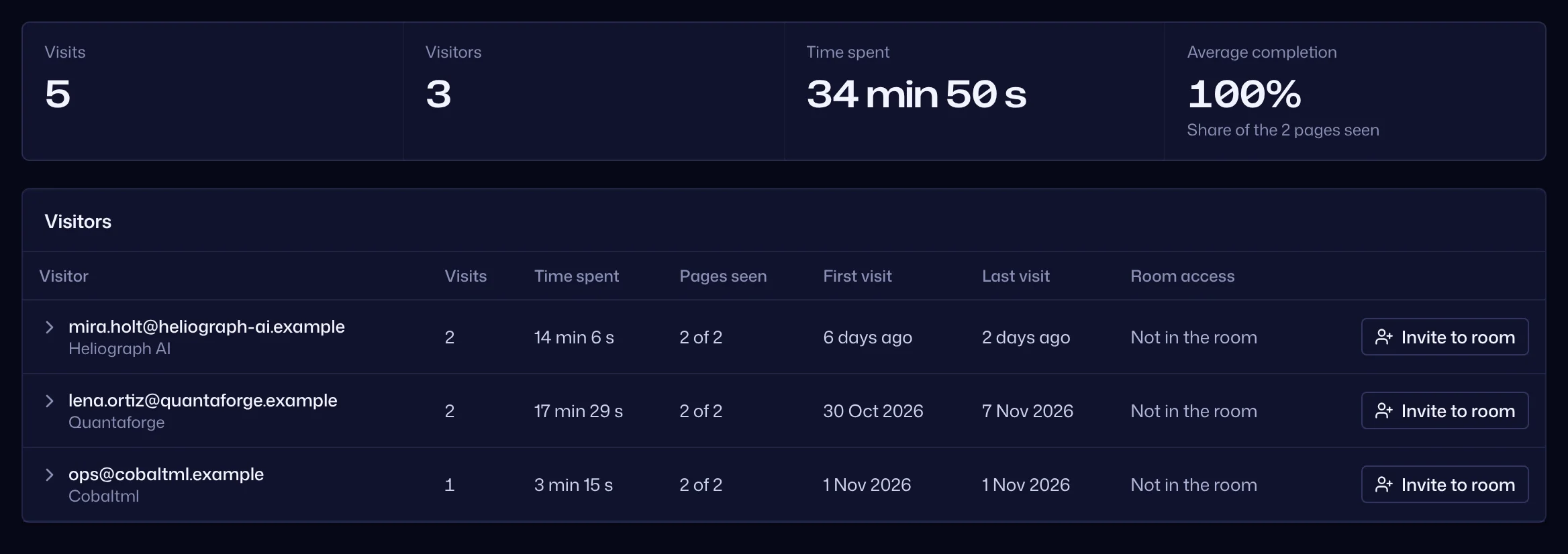
- Every visit logged
- Who opened it, when, for how long and which pages.
- From link to room
- Invite a visitor into the room as a party. They accept the NDA themselves when they join.
- Honest warnings
- A link bypasses stage gates by design, so the room warns you when a link points at a later-stage folder.
Sign-in and your team
Strong sign-in for guests and for your team, without making guests learn anything.
- Passwords and two-factor
- Passwords of at least 12 characters, with common ones refused. Authenticator codes with single-use recovery codes, required per room or per company for guests.
- Single sign-on for your team
- Through any OpenID Connect provider, such as Google Workspace, Microsoft Entra ID, Okta or Keycloak, and an option that makes two-factor mandatory for the team. Guests keep signing in with their invitation.
- Roles
- Owner, admin and editor per room. Editors upload, organize and draft answers; owners and admins manage access, approve answers and change settings.
- Notifications
- In the app and by email: new documents, answers released, NDA accepted, certificates expiring, parties gone quiet.
AI assist, if you want it
Off unless it is turned on, and for your team only.
- Summaries and suggested answers
- Your team can ask for a document summary or a suggested answer to a question. Both are labeled as AI drafts.
- The same permissions
- Suggested answers use and cite only documents the asking company may see.
- A person decides
- Nothing an AI drafted reaches a guest until a team member releases it, and every AI call is in the activity log. When it is on, the text of the documents involved is sent to the AI provider.
Coming next
Not in the product yet. Plans can change, so do not buy for these.
Planned
- A company signatory who signs for the whole company, and signed NDA certificates for both sides
- NDA text per company, and e-signature through a provider
- Your logo, colors and domain in rooms and emails
- SAML and SCIM
- API and MCP access for partners
- Templates for M&A sell side and fundraising
See it on your own deal
Request early access, or ask us to install Zizora on your own server.